Self-Hosted MIT License v0.7.5

Tasks–To Do Sync Keep Google Tasks
& Microsoft To Do
in one seamless loop.

A private, self-hosted bridge that keeps your daily tasks effortlessly in sync across both ecosystems. Capture anywhere, check off anywhere. No third-party sync server, no subscriptions. Runs privately inside your own Google Apps Script project.

✨ One-time setup · Official OAuth sign-ins · Automatic background sync every 10 min

Live Sync Simulation Trigger: Every 10 min
Google Tasks
Review Q3 Roadmap Work
Reply to Manager Synced
Coffee & Milk Personal
Microsoft To Do
Review Q3 Roadmap Work
Reply to Manager Done
Coffee & Milk Personal
+ New Task
✓ Completed
✎ Update Notes
⏰ Due Date Change
Bidirectional Loop Anti-Loop Guard Auto List Discovery Safe Deletion Protocol
Everyday Reality

Your tasks don't always begin in the same app

Modern work spans multiple ecosystems. Ideas strike anywhere, but without real-time sync, to-dos get scattered and forgotten.

🎙️

Voice Capture via Gemini

"Hey Google, remind me to buy coffee tomorrow." Captured into Google Tasks, but needed in Microsoft To Do on your work PC? Now fully synced.

✉️

Flag Emails in Outlook

Flag an email in Microsoft Outlook to add it to To Do, and it automatically appears in your mobile Google Calendar sidebar Tasks.

🤖

Copilot Document Summaries

Microsoft 365 Copilot generates project to-dos that seamlessly mirror into your personal Google workflow without manual copy-pasting.

🍎

Apple Reminders & Siri Bridge

Connect through your Microsoft account to iOS Reminders, closing the loop across iPhone, Mac, Android, and Windows PCs.

Engine Capabilities

Full task lifecycle, synced across 8 dimensions

Not just a one-time create trigger: title edits, notes, due dates, list moves, and deletions are handled with durable state recovery.

Create & Edit Tasks

Creating or renaming a task on either platform precisely updates its counterpart without duplicate ghost entries.

Two-way ⇄

Complete & Reopen

Check items off or reopen uncompleted work anytime. Statuses settle cleanly without reviving finished tasks.

State Loop ⇄

Notes & Body Text

Bi-directional notes sync with clean line breaks and text formatting integrity preserved across both platforms.

Body Sync ⇄

Due Date & Timezone

Accurate IANA timezone conversion ensures due dates do not shift by a day due to UTC boundary differences.

Timezone Aware ⇄

Cross-List Moves

Destination-first move journals safely relocate tasks between categorized lists with state preservation.

List Moves ⇄

Deletion Safeguards

Two-round confirmation safeguards protect your lists from accidental network-drop wipeouts.

Protected 🛡️

Tombstone Tracking

Durable tombstones prevent deleted items from resurrecting on subsequent runs as zombie tasks.

No Zombies 👻

Batch Self-Healing

6-minute Apps Script execution limit guard; auto-saves progress and seamlessly resumes on the next trigger.

Self-Healing ⚙️
Architecture

Why you need a stateful sync engine, not Zapier recipes

Trigger-action tools lack state memory: maintaining two live task databases is a distributed state consistency challenge.

✕Generic Automation Tools (Zapier / Make)

  • Independent triggers easily fight each other in endless loops
  • A typo edit can trigger duplicate creations
  • Completion, deletion, and move logic must be manually stitched together
  • Your private to-do data passes through commercial third-party servers
  • Monthly per-task pricing quickly escalates with active use

✓Tasks–To Do Sync Engine

  • Single-loop state machine: stable UUID mappings across lists and tasks
  • Full task lifecycle: create, edit, complete, due date, move, and delete handled together
  • Built specifically for these 2 apps: conflict checks, move journals, tombstones
  • Private by design: code, credentials, and state live solely in your Google account
  • Completely free & open source: MIT licensed, never a subscription fee
Engineering Proof

Auditable reliability & absolute privacy

417
Automated tests covering sync engine
8
Two-way synced data categories
10 min
Background sync trigger cadence
$0
Subscription fees · Free forever

Your task data never touches any third-party server

No external database, no SaaS middleware, no tracking cookies. Everything executes inside your private Google Apps Script. Open source under MIT, audited by GitHub CI and CodeQL static analysis.

Get Started

Get synced tonight in under 5 minutes

Deploy in minutes: one command creates your private Google project, then the guided web wizard finishes setup in your browser.
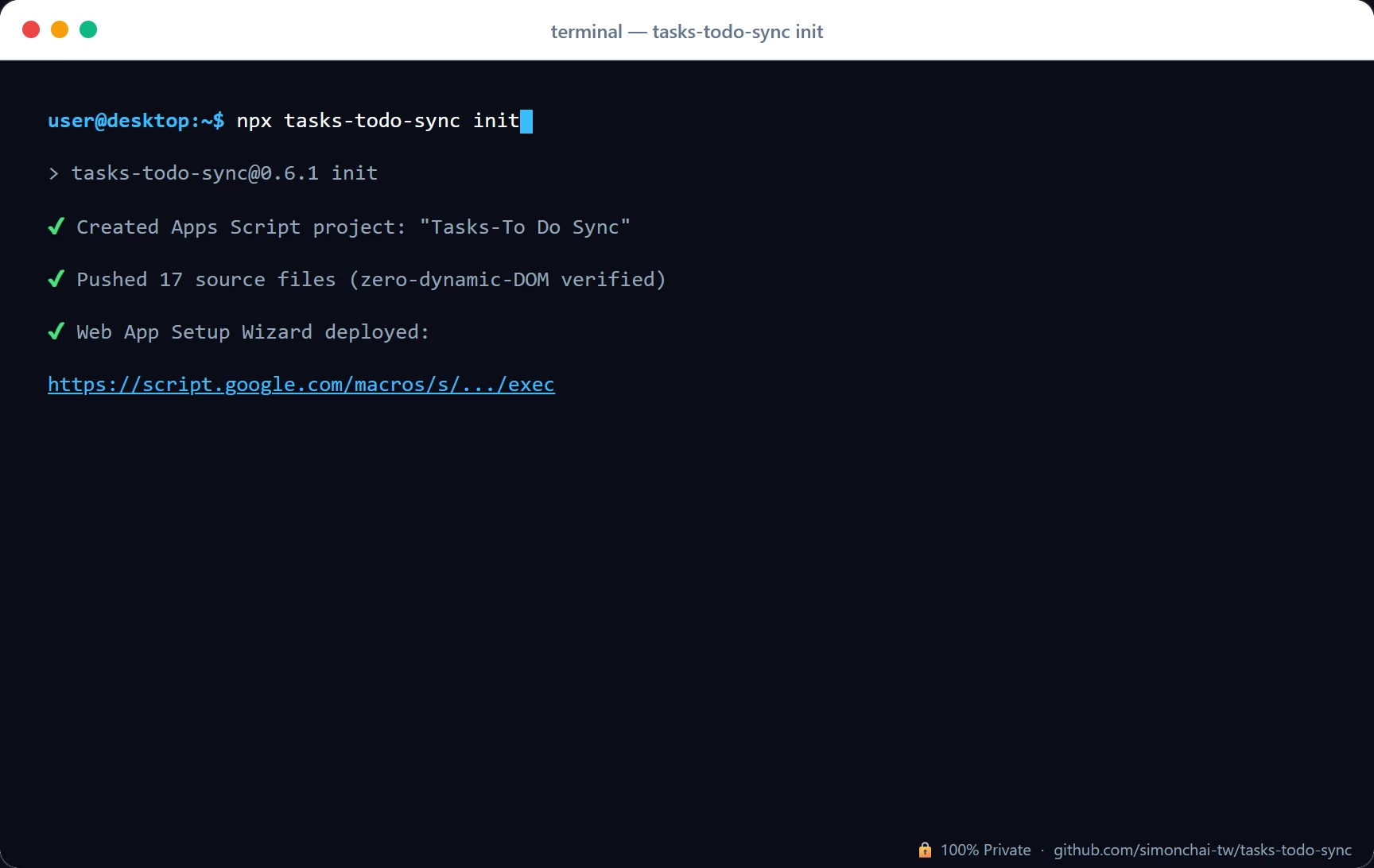
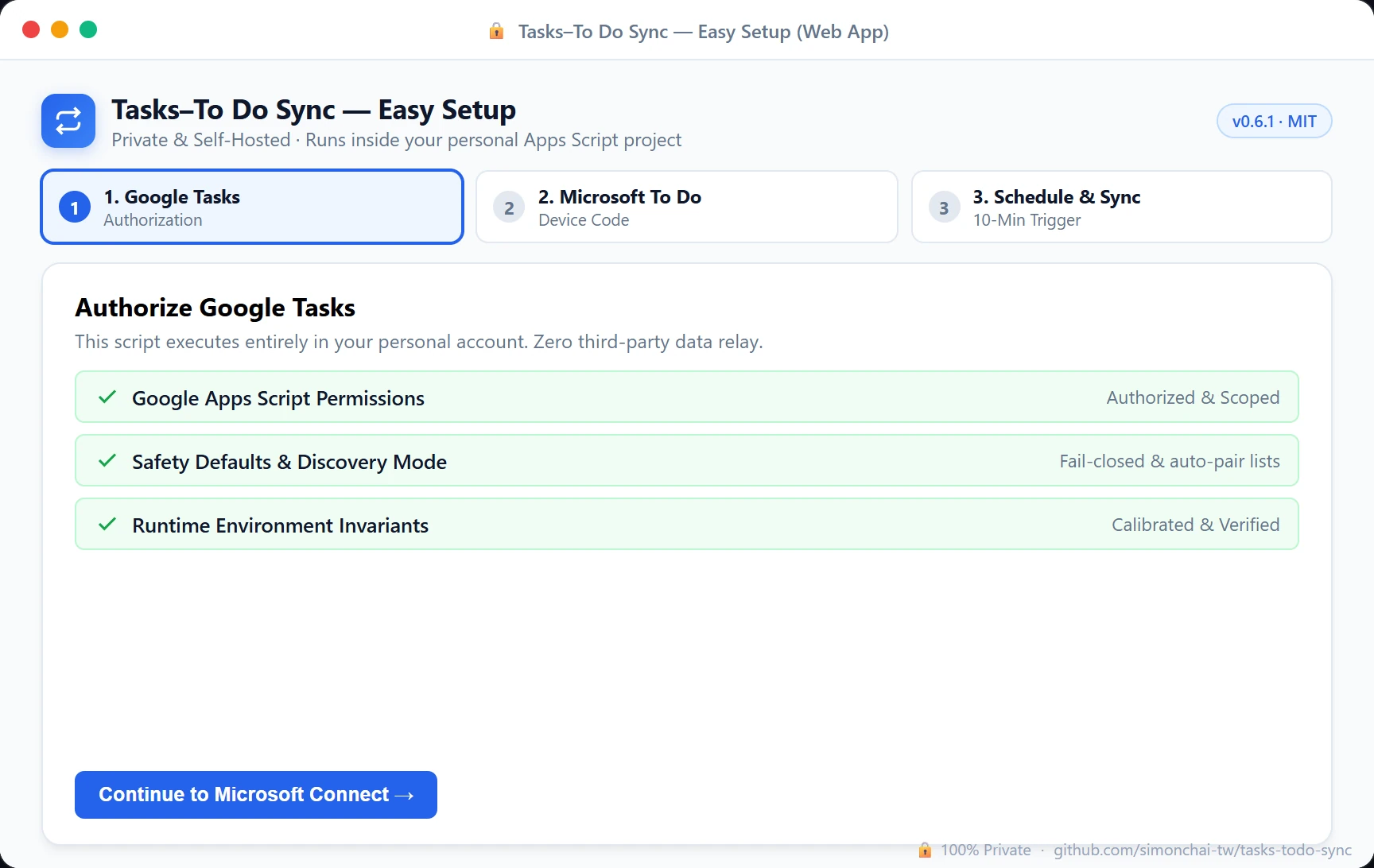
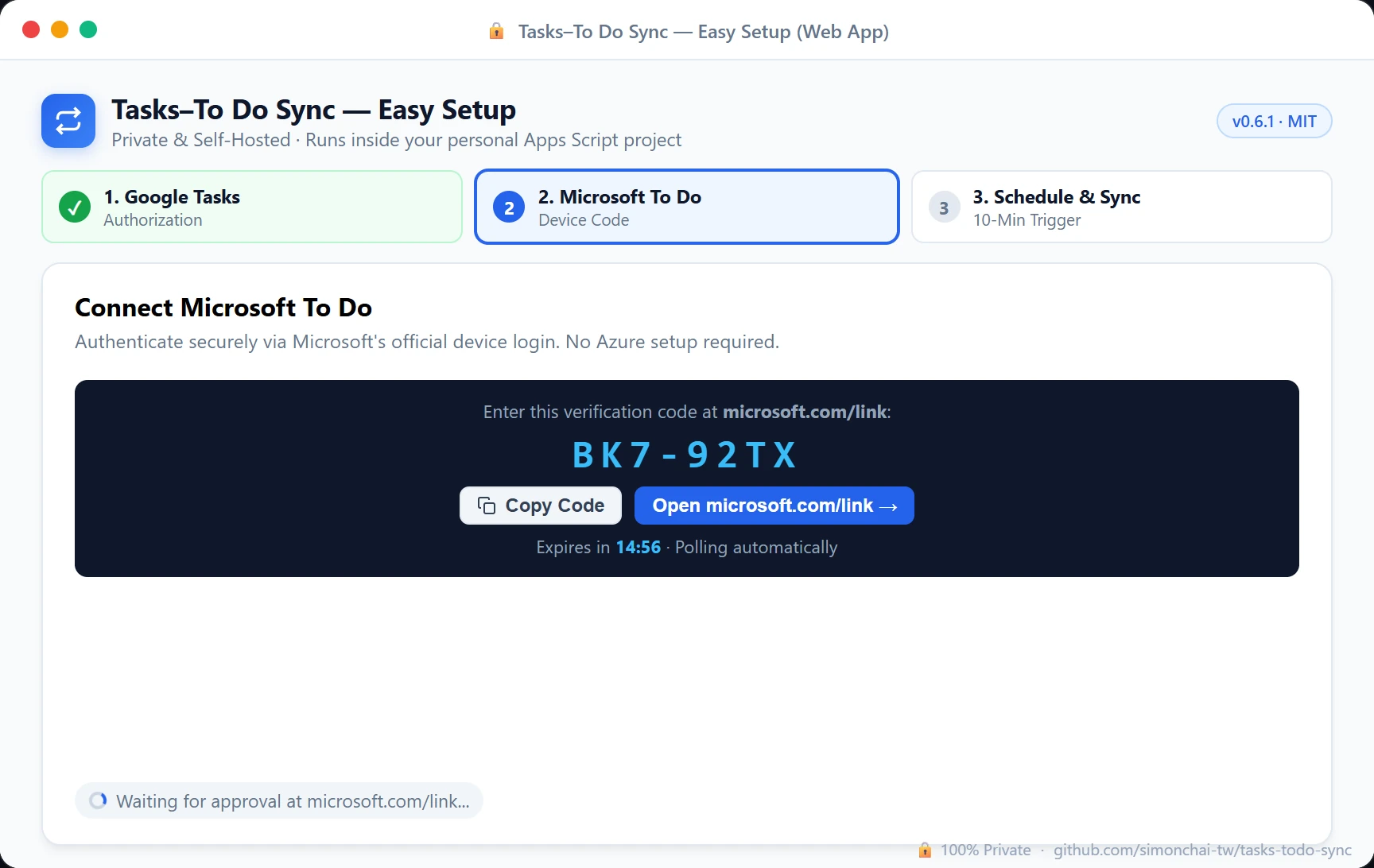
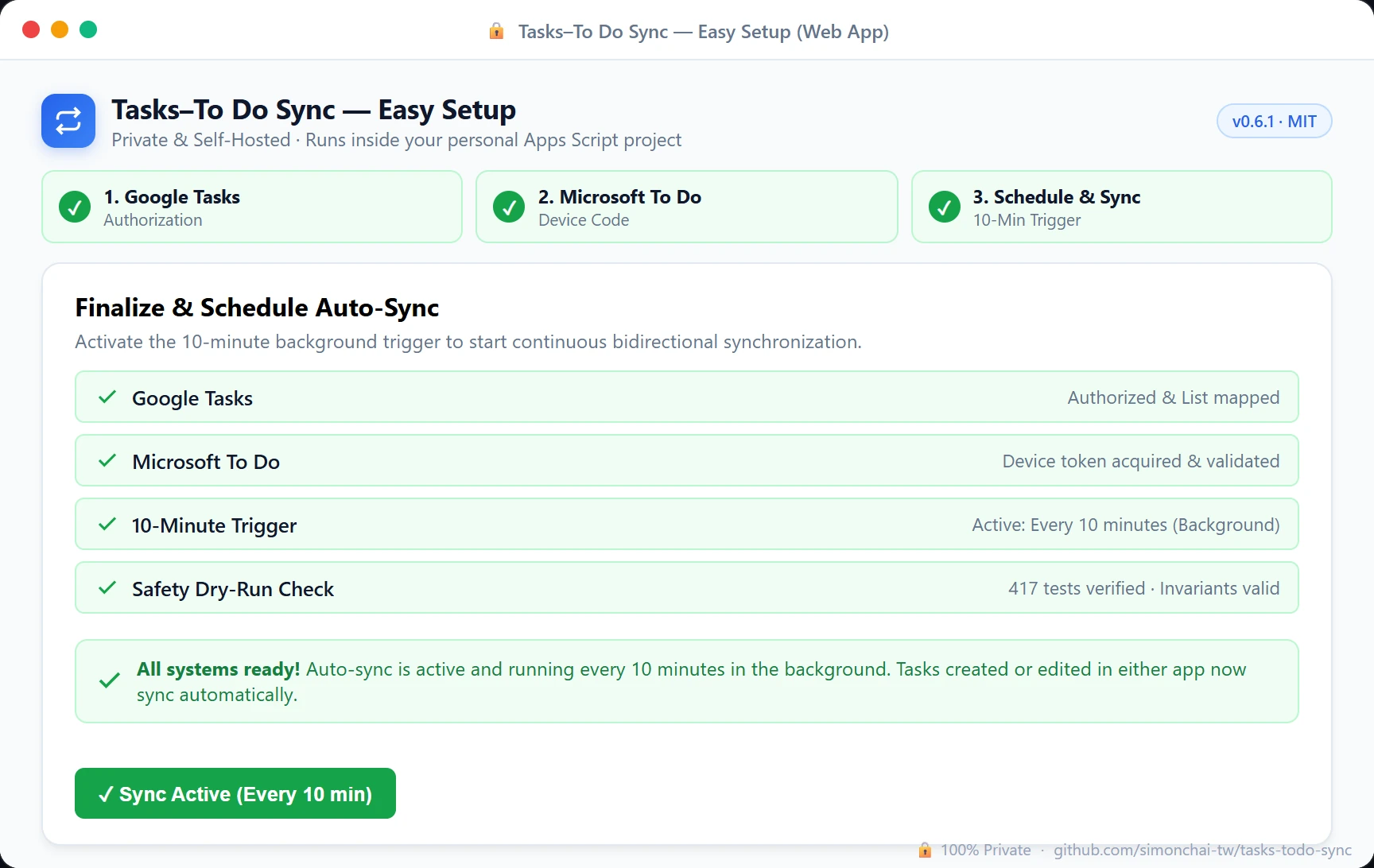
Step 1: Run Setup Command Step 2: Google Tasks Authorization Step 3: Connect Microsoft To Do Step 4: Activate 10-Minute Sync
Step 1 of 4
1

Run Setup Command

Open terminal and run npx tasks-todo-sync init to create your private project.

2

Deploy & Open Wizard

Open the printed URL, click Deploy → Web app, and open the generated link.

3

Connect Microsoft Account

In the wizard, click "Connect" and enter the code at microsoft.com/link.

4

Activate 10-Minute Sync

Click "Activate" in the wizard to start automatic background synchronization!

Concept Video

See the vision behind Tasks–To Do Sync

Capture anywhere, check off anywhere. Keeping Google Tasks and Microsoft To Do seamlessly connected throughout your day.

Official Concept · 720p HD

Tasks–To Do Sync Official Concept Video

Experience a day in the life with seamless task sync: capture thoughts on the street with Gemini, check off items in Outlook at your desk, and stay on track at home. Click the poster to play in-place via YouTube.

Concept Promo YouTube Stream
Open on YouTube ↗
Documentation

Fully documented, transparent and auditable

🗺 Roadmap

  • Frictionless setup for everyone — a streamlined onboarding path that removes terminal prerequisites, making private self-hosting effortless for everyday users.
  • Scalable & resilient self-healing — richer diagnostic tools and incremental delta processing beyond lightweight serverless runtimes.
  • Cross-cloud attachment vault — save Microsoft To Do attachments to Google Drive and link them directly in Google Tasks.
Copied to clipboard! ✓